
Electronics & Tech: Optimizing for Rufus’s Spec Comparison Engine
Why Amazon Rufus Ignores Your Electronics Bullet Points During Spec Comparisons
Quick Answer: When shoppers ask Rufus to compare electronics, it queries Amazon's structured catalog data fields first — not your bullet points or title. Electronics sellers who leave backend spec fields incomplete are effectively invisible in Rufus comparison responses, regardless of how well-written their listings are.
Table of Contents
How Rufus Actually Runs a Spec Comparison
Structured Data Gets Called Before Listing Copy
The Catalog Fields That Matter in Electronics
Structured vs. Unstructured Data: How Rufus Reads Each
The Spec Format Problem Nobody Talks About
How to Optimize for Rufus Comparison Queries
FAQ
Key Takeaways
How Rufus Actually Runs a Spec Comparison
When a shopper types "what's the difference between these two wireless earbuds" or "which laptop has better battery life," they've triggered something most electronics sellers don't even know exists: Rufus's spec comparison engine.
This is a distinct function from standard product discovery. Rufus isn't just finding relevant products at this point — it's doing structured attribute extraction across multiple ASINs and building a side-by-side response in real time. The process, as described in Amazon's official Rufus technical overview, relies on RAG (Retrieval-Augmented Generation) pulling from a combination of evidence sources before generating any response.
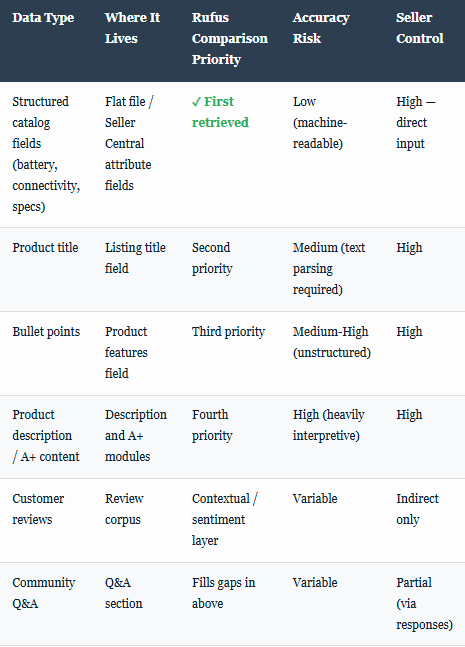
The critical insight that most optimization guides miss: the RAG retrieval layer doesn't start with your title or bullet points. It starts with Amazon's structured catalog database. For electronics categories, that means product type-specific attribute fields — connector type, battery capacity (mAh), wireless standard, screen resolution, refresh rate, processor series, RAM capacity, and dozens more. Your listing copy gets consulted secondarily, if at all, when those fields are populated.
What this means practically: A listing with a well-optimized title and compelling bullets but incomplete structured data fields will lose every Rufus comparison to a competitor whose listing copy is mediocre but whose catalog attributes are complete. The spec comparison engine can't compare what it can't find in structured form.
Structured Data Gets Called Before Listing Copy
As the IEEE Spectrum deep-dive on how Amazon built Rufus confirms, Rufus uses RAG to pull in information before generating a response — and retrieval sources are prioritized. Amazon's product catalog structured data is the highest-confidence, lowest-latency source available to the model. Product descriptions and bullet points are unstructured text that requires additional parsing and semantic interpretation.
This matches what we've observed in client accounts at Atomic: when structured data fields are complete and accurate, Rufus comparisons consistently reflect those specs correctly. When fields are missing or contain default placeholder values, Rufus either omits that product from comparisons or — worse — fabricates plausible-sounding specs based on the listing copy context, which creates return rate problems.
As the Francesca Tabor analysis of Rufus architecture noted, the system's success during Prime Day peak load conditions came precisely because it leaned on structured product data rather than relying solely on generative interpretation of unstructured text. Clean, structured data produces fast, accurate, trustworthy answers. Messy catalog data produces wrong answers.
This connects to the broader point covered in our post on how Cosmo's backend data model shapes what Rufus surfaces — the 18 structured fields Cosmo processes before any copy examination don't include bullet points. For electronics, those fields are even more granular than in most other categories.
The Catalog Fields That Matter in Electronics
Electronics is one of Amazon's most attribute-dense categories. The Amazon Seller Central product detail page guidance lists category-specific required and recommended fields, but it doesn't explain how heavily they're weighted in AI retrieval contexts.
Based on what Rufus comparison responses consistently pull from, the highest-priority structured fields for electronics optimization fall into three groups:
Power and endurance specs: Battery capacity in mAh or Wh, battery life in hours (idle vs. active), charging wattage, fast-charge compatibility (20W, 45W, 65W, etc.), and power source type. When shoppers ask "which one has better battery life," Rufus is pulling this field directly. A listing that only mentions "all-day battery" in bullets will lose to a listing that has "30 hours" in the battery life field, even if the copy version is technically accurate.
Connectivity and compatibility specs: Bluetooth version (5.0, 5.2, 5.3), Wi-Fi standard (802.11ax/Wi-Fi 6, Wi-Fi 6E), connector type (USB-C, Lightning, 3.5mm), wireless protocol, frequency band support (2.4GHz / 5GHz / 6GHz). These fields drive comparisons on "works with" queries — "will this work with my MacBook," "which supports Wi-Fi 6E," etc.
Performance specs: For audio products: driver size, frequency response range, active noise cancellation type. For displays: resolution, refresh rate, panel type (IPS, OLED, AMOLED). For computing products: processor family, RAM type and speed, storage type. The key here is that Rufus matches these to buyer intent — someone asking "best laptop for video editing under $1,500" gets a response that's matching processor and RAM fields, not reading your bullet about "powerful performance."
Structured vs. Unstructured Data: How Rufus Reads Each
The Spec Format Problem Nobody Talks About
Even sellers who fill out structured fields often run into a specific Rufus failure mode: inconsistent formatting and units. Rufus's comparison engine is performing semantic matching across multiple ASINs simultaneously. When one ASIN has "Battery Life: 30 hrs" and a competitor has "Battery Capacity: 1500mAh," Rufus is dealing with fundamentally different data types that describe different aspects of the same dimension.
This matters because the comparison engine needs to resolve these into a single output statement. When fields don't use consistent units or measurement types, Rufus either hedges ("both offer long battery life") or falls back to listing copy, which means unstructured text interpretation and the accuracy risks that come with it.
Practical examples of the format problem in electronics:
Audio: Driver size listed as "40mm" vs. "40 millimeter" vs. "40" — the latter often triggers catalog data errors because Amazon's systems expect a specific unit format
Displays: Resolution listed as "1920x1080" vs. "Full HD" vs. "FHD 1080p" — only the numeric format maps cleanly to structured comparison
Charging: "USB-C 65W PD" vs. "65W charging" vs. "Power Delivery 3.0" — all refer to the same capability but Rufus treats them as distinct attributes
Bluetooth: "BT 5.3" vs. "Bluetooth Version 5.3" vs. "Bluetooth 5.3" — most resolve correctly, but version-only entries without the "Bluetooth" label sometimes fail attribute matching
The fix isn't complicated but it requires attention: use Amazon's exact field label conventions, use numeric values where fields expect numeric values, and include the unit as specified in the field requirements. This also connects to the suppression triggers we've documented across seller accounts — malformed attribute data is one of the less-discussed paths to listing suppression in electronics categories.
Quick audit: Open your listing in Seller Central, go to Manage Inventory, click Edit, and navigate to the "Vital Info" and "More Details" tabs. Count how many spec fields are blank or say "Does Not Apply" when they actually do apply to your product. That number represents exactly how many spec comparison queries Rufus can't properly include you in.
How to Optimize for Rufus Comparison Queries
The optimization approach here is different from what most Amazon content guides recommend, because the leverage point is in catalog management rather than copywriting. That said, listing copy still plays a role in the second layer of retrieval — it just can't substitute for missing structured data.
Step 1: Complete your electronics category attributes systematically. Don't rely on Amazon's auto-populated fields from manufacturer data. Amazon scrapes manufacturer websites to pre-fill attributes, and the accuracy rate on scraped data varies significantly. Go through every relevant attribute in your flat file template for your specific subcategory (headphones, laptops, cables, smart home devices all have different required fields) and fill each one manually with accurate, correctly formatted values.
Step 2: Test your comparison surface area. Open a secondary Amazon account (or have a trusted person do this) and ask Rufus comparison queries that involve your ASIN. Try: "What's the difference between [your product name] and [top competitor]?" Note exactly which specs Rufus surfaces and which it omits or gets wrong. The omitted specs are unfilled structured fields. The wrong specs are either incorrect structured data or Rufus filling gaps from unreliable copy.
Step 3: Resolve data conflicts across your listing. One of the more damaging patterns we see is when a seller's structured data says one thing and their bullet points say another — often because the original listing was created with placeholder data and the copy was updated but the backend fields weren't. Rufus's RAG layer can surface both versions in a comparison response, creating conflicting information that degrades buyer confidence and return rates. Audit for consistency across every channel.
Step 4: Populate your Q&A section with spec-based answers. As described in Amazon's technical documentation on how Rufus uses evidence sources, Q&A content is a legitimate retrieval target. For specs that don't map cleanly to structured fields — nuanced compatibility questions, ecosystem fit queries, performance-in-specific-context answers — the Q&A section gives you a place to provide machine-readable answers in natural language. "Does this work with [X]? Yes, it is fully compatible with [X] because it uses [specific standard/protocol]." That kind of response directly feeds Rufus comparison answers for compatibility queries.
This framework also aligns with what we documented in our breakdown of how Rufus ranking factors differ from traditional A9 — the signal hierarchy is fundamentally different, and structured data sits at the top of that hierarchy in a way it never did for keyword-based search.
For electronics sellers specifically, the implication is that your catalog management team needs to be thinking about AI retrieval, not just keyword coverage. The flat file template for electronics has well over 100 potential attribute fields. Most sellers fill maybe 20% of them. Competitors who treat catalog completeness as a strategic asset — not an administrative task — are going to dominate Rufus comparison surfaces for years.
Understanding how Rufus attribution tracks the downstream revenue impact of these comparison-driven recommendations also matters here. When Rufus includes your product in a spec comparison and a buyer makes a decision, that interaction is tracked across a 7-day attribution window. Sellers who consistently show up in comparisons are building a compounding advantage that doesn't show up in traditional search metrics.
Frequently Asked Questions
How does Amazon Rufus compare electronics products when a shopper asks?
Rufus runs a RAG retrieval process that queries structured catalog attribute fields first, then listing copy. It extracts comparable spec values across multiple ASINs and generates a natural language comparison. Listings with complete structured data appear most accurately in these responses.
Which electronics catalog fields does Rufus prioritize for spec comparisons?
Battery life, charging wattage, Bluetooth version, Wi-Fi standard, connector type, resolution, refresh rate, processor family, and RAM are the highest-priority fields for electronics comparison queries. These map directly to common buyer comparison questions.
Can well-written bullet points substitute for incomplete structured data fields in Rufus comparisons?
No. Structured catalog fields are retrieved first and are machine-readable with high reliability. Bullet points are unstructured text that requires semantic interpretation. Incomplete structured fields cause Rufus to omit your product or produce inaccurate comparison responses.
What happens when an electronics listing has spec data in bullets but not in structured fields?
Rufus may miss the product in direct comparison queries, produce incorrect spec summaries, or omit key specs because it couldn't confidently parse unstructured text. This is one of the most common and least-visible visibility problems in electronics categories.
Does Rufus use customer reviews to fill in missing spec data?
Yes, as a fallback source. Amazon's RAG architecture includes reviews as an evidence source. If structured fields are empty and listing copy is vague, Rufus may extract spec mentions from reviews — introducing accuracy risk since review specs are user-reported rather than verified.
How do formatting inconsistencies in structured data affect Rufus comparisons?
Rufus comparison logic needs consistent units and value formats to match attributes across ASINs. "30 hrs" and "1800mAh" describe different battery dimensions — Rufus treats them as non-comparable. Use numeric values and Amazon's expected unit formats to ensure clean attribute matching.
What is the fastest way for an electronics seller to audit Rufus comparison visibility?
Use a secondary Amazon account to ask Rufus direct comparison questions involving your ASIN and top competitors. Note which specs appear, which are wrong, and which are missing. Missing specs = unfilled catalog fields. Wrong specs = data errors or copy-vs-field conflicts.
Does A+ content help with Rufus spec comparisons?
A+ content is a lower-priority retrieval source than structured fields, title, and bullets. Comparison tables in A+ content may help Rufus interpret contextual relationships between specs, but they don't substitute for properly populated product attribute fields in the catalog.
How does Rufus handle electronics compatibility queries like "will this work with my iPhone"?
Rufus queries compatibility attributes in structured data first, then Q&A content, then listing copy. Sellers who populate compatibility fields and add specific Q&A responses about common device pairings dominate these queries. Generic "compatible with most devices" copy provides no useful signal.
Is Rufus spec comparison behavior different for electronics than other Amazon categories?
Electronics categories have significantly more granular structured attribute requirements than most other Amazon categories. The density of technical specs buyers compare — combined with the high-consideration nature of electronics purchases — makes structured data completeness more commercially critical here than in most categories.
Key Takeaways
Rufus spec comparisons retrieve structured catalog attribute fields before reading any listing copy — electronics sellers must treat catalog completeness as a primary optimization task, not an admin task.
The most commercially impactful structured fields for electronics are: battery life (hours), charging wattage, Bluetooth version, Wi-Fi standard, connector type, resolution, refresh rate, processor family, and RAM.
Spec data in bullet points does not substitute for empty structured fields — Rufus's retrieval architecture treats these as different data sources with different reliability weights.
Formatting inconsistencies (wrong units, text where numeric is expected) cause attribute matching failures that make your product disappear from comparison responses even when the underlying data is correct.
Conflicts between structured fields and listing copy — common when copy is updated but backend data isn't — produce inaccurate Rufus comparison outputs that drive return rates.
The Q&A section is an underused structured evidence source for compatibility and ecosystem-fit queries that don't map cleanly to standard attribute fields.
The audit is simple: use a secondary account to ask Rufus comparison questions about your ASIN. What's missing from the response represents your actual structured data gaps.
References
Amazon Science. (2024).The technology behind Amazon's GenAI-powered shopping assistant, Rufus. amazon.science
Chilimbi, T. (2024, October). How we built Rufus, Amazon's AI-powered shopping assistant.IEEE Spectrum. spectrum.ieee.org
Amazon Seller Central. (2025).Product detail page rules. sellercentral.amazon.com
Amazon. (2024).Amazon announces Rufus, a new generative AI-powered conversational shopping experience. aboutamazon.com
Tabor, F. (2025). Inside Amazon Rufus: The AI playbook for speed, scale, and retail advantage. francescatabor.com
The observations in this post are based on documented Rufus behavior patterns across seller accounts and analysis of Amazon's publicly available technical documentation. Amazon's systems evolve continuously; specific behavior may change as Rufus updates. Always verify optimization approaches against current Seller Central guidelines.
