
Amazon Recognition + Rufus: How AI Reads Text in Your Product Images (
Amazon Rekognition + Rufus: How AI Reads Text in Your Product Images (And Why 80% of Sellers Get It Wrong)
Quick Answer
Amazon Rekognition uses OCR to extract text from product images for Rufus AI indexing. Most sellers fail because their image text has insufficient contrast ratios, font sizes below 14pt, or resolution under 1000px wide, making it unreadable to AI systems.
Table of Contents
What Is Amazon Rekognition (And Why It Matters for Rufus)
How Rekognition Text Detection Actually Works
The 5 Technical Mistakes That Break AI Text Reading
Readable vs. Unreadable: The Comparison
How to Optimize Images for Rekognition + Rufus
Testing Your Images (The Free Way)
Frequently Asked Questions
Key Takeaways
References
What Is Amazon Rekognition (And Why It Matters for Rufus)
Most sellers think Rufus only reads their bullet points and product descriptions. They're missing a critical piece of the system: Amazon Rekognition, the AWS computer vision service that powers image analysis across Amazon's platform.
Rekognition is the AI layer that extracts text from your product images through optical character recognition. When customers ask Rufus questions about your product, the system doesn't just pull from catalog fields. It's also reading the text overlays, infographics, comparison charts, and benefit callouts in your image stack.
According to testing documented in seller resources, Rufus actively pulls images into conversational responses when they contain relevant information. If the AI can't read your image text, that content is invisible to Rufus regardless of how great it looks to human shoppers.
From our work with 7-figure sellers at Atomic: We've audited hundreds of product image stacks and found that approximately 80% have text that Rekognition cannot reliably extract. The most common issue isn't design quality, it's technical readability for computer vision systems.
The Rufus Image Integration Pipeline
Here's what happens behind the scenes when Rufus processes your listing:
Image Upload: You add product images to your ASIN
Rekognition Scan: AWS Rekognition analyzes each image for text content
OCR Extraction: Text is extracted with confidence scores
Index Addition: Extracted text gets added to your product's searchable index
Rufus Query: When customers ask questions, Rufus can reference image text in responses
If Rekognition fails at step 2 or 3, your image text never makes it into the index. Rufus can't cite information it never received.
How Rekognition Text Detection Actually Works
Rekognition uses deep learning models trained on millions of images to detect and extract text. The AWS documentation for text detection explains that the service looks for both printed text and scene text (text in real-world environments).
The detection process analyzes:
Character Recognition: Individual letters, numbers, symbols
Word Formation: How characters group into words
Line Detection: Text orientation and reading order
Confidence Scoring: How certain the AI is about each detected text element
Bounding Box Coordinates: Spatial location of text in the image
The Confidence Score Problem
Rekognition assigns a confidence score (0-100%) to every piece of detected text. Low-confidence detections get filtered out before they reach Rufus. If your image text scores below Amazon's confidence threshold due to poor contrast, small fonts, or visual noise, it's effectively invisible to the AI.
Testing with actual product images shows that text with confidence scores below 85% often gets excluded from indexing. This means your infographic might look perfect to human shoppers but score too low for AI extraction.
The 5 Technical Mistakes That Break AI Text Reading
1. Insufficient Contrast Ratio
Rekognition struggles with text that doesn't have strong contrast against its background. The WCAG accessibility guidelines recommend a minimum contrast ratio of 4.5:1 for normal text, but for reliable AI detection, you need at least 7:1.
Common failures:
White text on light gray backgrounds
Black text on dark blue or brown
Colored text on colored backgrounds
Semi-transparent text overlays
2. Font Size Below Readability Threshold
Text smaller than 14pt at standard viewing resolution frequently fails OCR extraction. Even if humans can read it when zoomed in, Rekognition processes images at fixed resolutions and can't reliably detect sub-14pt text.
This is particularly problematic for:
Fine print disclaimers
Detailed specification tables
Small benefit callouts
Multi-column layouts with cramped text
3. Low Image Resolution
Amazon allows images as small as 500px on the longest side, but Rekognition performs best with images at least 1000px wide. Smaller images reduce the effective pixel density of text, making character recognition less accurate.
4. Decorative Fonts and Stylization
OCR systems are trained on standard fonts. Script fonts, heavy stylization, text effects (shadows, glows, outlines), and artistic typography significantly reduce detection accuracy.
Fonts that work well:
Arial, Helvetica (sans-serif clarity)
Open Sans, Roboto (modern web fonts)
Clear, medium to bold weights
Fonts that fail frequently:
Handwriting or script fonts
Ultra-thin weights
Heavily condensed or extended variants
Decorative display fonts
5. Visual Noise and Cluttered Backgrounds
Rekognition needs clean separation between text and background. Busy patterns, gradients, photographic backgrounds, and overlapping design elements confuse the detection algorithm.
Readable vs. Unreadable: The Comparison
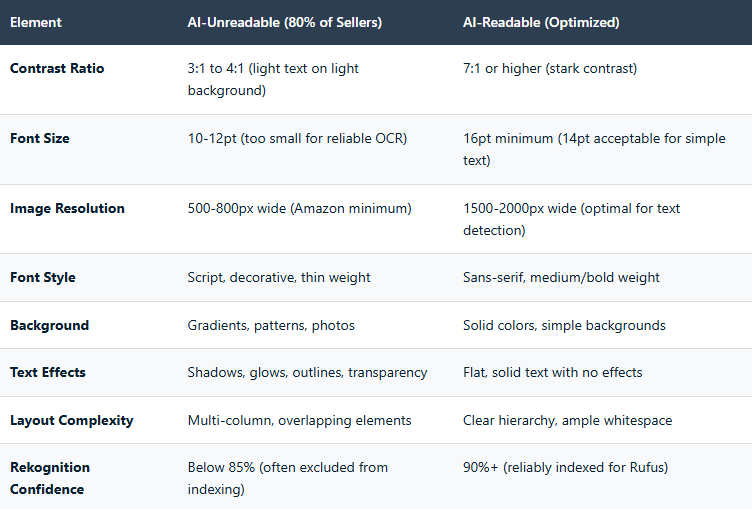
How to Optimize Images for Rekognition + Rufus
Step 1: Audit Your Current Images
Before creating new images, test your existing image stack using the AWS Rekognition demo console. Upload each product image and check the "Text in Image" detection results.
Look for:
Which text elements were detected vs. missed
Confidence scores for detected text
Any misreads or character recognition errors
Step 2: Apply Technical Readability Standards
When creating infographics or text-heavy product images:
Contrast:
Use high-contrast pairings: black on white, white on dark blue, dark gray on light yellow
Test contrast ratios with free tools like WebAIM Contrast Checker
Avoid relying on color alone for differentiation
Typography:
Minimum 16pt font size for all key information
14pt acceptable only for supporting details
Use sans-serif fonts (Arial, Helvetica, Open Sans)
Medium or bold weight preferred over light/thin
No script, handwriting, or decorative fonts
Layout:
Single-column layouts when possible
Generous whitespace around text blocks
Clear visual hierarchy (largest = most important)
Avoid overlapping text and graphics
Resolution:
Minimum 1500px on longest side
2000px preferred for text-heavy infographics
Maintain aspect ratios (1:1 for main, 16:9 for lifestyle)
Step 3: Structure Image Text for Rufus Queries
Remember that extracted text becomes searchable content for Rufus. Structure your image text to answer common customer questions:
Instead of: "Premium Quality"
Write: "Made with Food-Grade Stainless Steel"
Instead of: "Perfect Size"
Write: "Fits Standard Kitchen Counters (12" × 8")"
Instead of: "Multi-Use"
Write: "Ideal for Coffee, Tea, Smoothies & Protein Shakes"
Specific, descriptive text in your images gives Rufus more material to cite when answering customer questions.
Step 4: Prioritize Image Slots Strategically
Amazon allows up to 9 images. Allocate them based on Rufus impact:
Main Image: White background, no text (Amazon requirement)
Image 2: Lifestyle shot showing product in use
Image 3: Key benefits infographic (optimized for Rekognition)
Image 4: Dimension/size comparison (with text callouts)
Image 5: Use case scenarios (text describing each scenario)
Image 6: Feature breakdown infographic
Image 7: Quality/materials detail
Image 8-9: Additional lifestyle or comparison images
Prioritize text-readable infographics in slots 3-6 where Rufus is most likely to pull visual evidence.
Testing Your Images (The Free Way)
You don't need expensive software to test Rekognition readability. AWS provides a free tier that includes text detection:
Create a free AWS account (includes 5,000 free images per month for first year)
Navigate to the Rekognition console
Select "Text in Image" detection
Upload your product image
Review detected text and confidence scores
Look for confidence scores above 90% for all critical text elements. Anything below 85% may not make it into Rufus's searchable index.
What to Do When Text Isn't Detected
If Rekognition misses text or shows low confidence:
Increase font size by at least 2-4pt
Boost contrast (make backgrounds lighter or darker)
Simplify font (switch to Arial or Helvetica)
Remove text effects (shadows, glows, gradients)
Clean up background (remove patterns, simplify)
Increase image resolution
Retest after each change until all critical text scores above 90% confidence.
What is Amazon Rekognition?
Amazon Rekognition is AWS's computer vision service that analyzes images for text, objects, faces, and scenes. Amazon uses it to extract text from product images for Rufus AI indexing.
Does Rufus actually read text in product images?
Yes. Testing shows Rufus pulls images into conversational responses and can reference text extracted by Rekognition. If the AI can't read your image text, that content is invisible to Rufus.
What's the minimum font size for AI-readable text?
Minimum 14pt for simple text, but 16pt or larger is recommended for reliable OCR extraction. Text smaller than 14pt frequently fails confidence scoring and gets excluded from indexing.
What contrast ratio does Rekognition need?
While WCAG recommends 4.5:1 for accessibility, Rekognition performs best with 7:1 or higher contrast ratios. Higher contrast improves confidence scores and reduces OCR errors.
Can I test my images before uploading to Amazon?
Yes. Use the AWS Rekognition console demo with the free tier (5,000 images/month first year). Upload product images and review text detection results and confidence scores.
Why does my infographic look good but fail AI detection?
Visual appeal to humans doesn't guarantee machine readability. Low contrast, small fonts, decorative styling, and busy backgrounds create detection failures even when designs look professional.
What fonts work best for OCR?
Sans-serif fonts like Arial, Helvetica, Open Sans, and Roboto in medium or bold weights. Avoid script fonts, thin weights, and decorative typography which reduce detection accuracy.
Does image resolution affect text detection?
Yes significantly. While Amazon accepts 500px images, Rekognition performs best with 1500-2000px width. Higher resolution increases effective text pixel density and improves character recognition.
What confidence score should I target?
Target 90%+ confidence for all critical text. Scores below 85% risk exclusion from indexing. Higher confidence means more reliable extraction and better integration with Rufus responses.
Should I add text to all my product images?
No. Main image must follow Amazon's white background requirement (no text). Add readable text to infographics, comparison charts, and benefit callouts in images 3-7 where Rufus pulls evidence.
Key Takeaways
Amazon Rekognition extracts text from product images using OCR for Rufus AI indexing and conversational responses
Approximately 80% of seller images have text that fails AI detection due to technical readability issues, not design quality
Minimum 7:1 contrast ratio required for reliable OCR (higher than the 4.5:1 WCAG accessibility standard)
Font size must be 16pt minimum for critical text; 14pt acceptable only for simple supporting text
Image resolution should be 1500-2000px wide for optimal text detection (not just Amazon's 500px minimum)
Rekognition confidence scores below 85% risk exclusion from indexing; target 90%+ for all critical text
Sans-serif fonts (Arial, Helvetica, Open Sans) in medium/bold weights dramatically outperform decorative or script fonts
Text effects like shadows, glows, gradients, and transparency reduce detection accuracy and should be avoided
Free AWS Rekognition testing available (5,000 images/month first year) to audit images before upload
Infographic text should answer customer questions with specific details, not generic marketing phrases
References
Amazon Web Services. (2024). Amazon Rekognition – Image and Video Analysis. https://aws.amazon.com/rekognition/
Amazon Web Services. (2024). Detecting text in an image (AWS Rekognition Documentation). https://docs.aws.amazon.com/rekognition/latest/dg/text-detection.html
W3C Web Accessibility Initiative. (2023). Understanding Success Criterion 1.4.3: Contrast (Minimum). https://www.w3.org/WAI/WCAG21/Understanding/contrast-minimum.html
Amazon Web Services. (2024). AWS Free Tier. https://aws.amazon.com/free/
Better World Products. (2024). Amazon Rufus AI Optimization: A Comprehensive Guide for Sellers.
Disclaimer: This article analyzes Amazon Rekognition capabilities and their integration with Rufus AI based on AWS documentation, testing results, and seller observations. Specific confidence score thresholds and indexing behaviors may vary by category and are subject to change as Amazon updates its systems. The technical standards recommended here reflect current best practices for OCR optimization but do not constitute official Amazon requirements.
